Scene 01Take 1●
Choose the audience before choosing the highlights
For a team season video, choose a short opening, several readable moments and an ending that gives the group time to react. Leave enough of a play to understand the setup and outcome. A rapid sequence of isolated contacts or celebrations may lose the story even when every shot looks exciting.
| Purpose | Make central | Decide first |
|---|---|---|
| Team keepsake or banquet | The whole group, progress, reactions and shared memories | Who receives the private version and who approves it |
| Public social reel | A small number of clear moments | Which files and people are cleared for that audience |
| One athlete’s recruiting reel | An identifiable athlete and useful views of their play | The current instructions of the intended coach or program |
Give each version its own brief. A team keepsake can include a quieter player, a practice improvement or a coach’s thank-you; it does not need to become an evaluation reel. The finished example below shows an end-of-season editing structure using archival footage.
Scene 02Take 1●
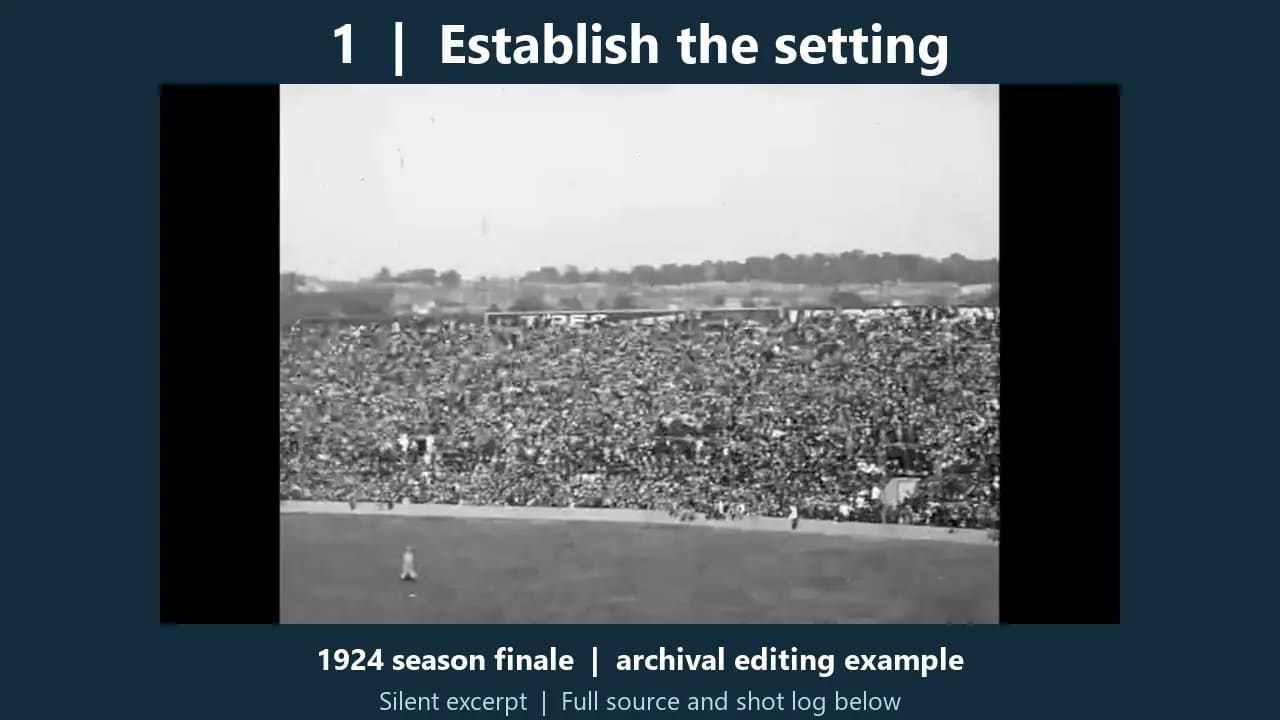
Watch the finished sixty-second season-finale edit
The example uses real 1924 baseball images from the Library of Congress’s source film. It is an archival season-finale edit, rather than a record of a modern team’s whole season. Original newsreel cuts remain inside some excerpts; the sequence does not claim to show one uninterrupted play.
Download the shot log and descriptive transcript or the timing and source manifest. These describe the external edit; they are not an AlbumMap project import. The full source file is linked in the manifest rather than repackaged as an input download.
Scene 03Take 1●
Follow the actual edit, clip by clip
| Finished time / length | Source and purpose |
|---|---|
| 0:00–0:06 · 6 seconds | Identify the year, subject and archival teaching example. |
| 0:06–0:14 · 8 seconds | Original file 0:24–0:32. Use a wide view before closer action. |
| 0:14–0:26 · 12 seconds | Original file 0:46.25–0:58.25. Keep a readable action sequence with the newsreel's own cuts. |
| 0:26–0:38 · 12 seconds | Original file 3:10–3:22. Show a later passage without claiming an uninterrupted camera take. |
| 0:38–0:48 · 10 seconds | Original file 3:30–3:40. Leave time for the crowd after the action. |
| 0:48–1:00 · 12 seconds | Identify the source and the silent edit. |
The six sections total 60 seconds: 6 + 8 + 12 + 12 + 10 + 12. In/out points are measured against the downloadable source file. An out point is where that excerpt stops; it is not an extra frame to include. The source pictures stay at their supplied speed and retain their shape inside the wider teaching layout.
The opening establishes the subject. A wide view makes the setting legible before the action. Two longer passages let the viewer follow movement, then the crowd supplies a reaction. The final card gives the source time of its own. For a modern team, replace those passages with approved practice, game and celebration material; keep the same beginning-to-ending logic.
Scene 04Take 1●
Record the source rights before you make the cut
For this example, the 1924 U.S. film images are assessed as public domain under the Copyright Office’s current duration guidance. That assessment applies to the old film images. The source page identifies a later score by Andrew Simpson; this finished file contains no audio stream. Sources and terms checked 24 October 2026.
| Material | Keep in the source log | Check before reuse |
|---|---|---|
| A family or player submission | Original filename, contributor, date, moment and approved audience | Who recorded it, who appears, and the team’s applicable media requirements |
| A broadcaster or league clip | The specific permitted use and any required credit | Public availability or a social-share button does not grant a general editing licence |
| An archive item | The item’s creator, date, source link, relevant rights basis and your changes | Later music, commentary or other additions may have separate rights |
Do not treat an archive’s entire collection as cleared because one older film can be reused. Assess the particular material and the intended territory and use. For current team footage, keep internal viewing and public promotion as separate choices; a file sent to the organizer does not settle permission for everyone shown.
Scene 05Take 1●
Collect a small, balanced set of team material
Ask for one useful view of a moment rather than every phone burst. Request the original file, game or practice date, people to identify, a sentence of context and the allowed audience. Choose the angle that explains the action, even when a closer view looks more dramatic.
Copy-ready request: “We are making a season keepsake for players and families. Please send one or two original clips by [deadline] through [approved collection link]. Include the date and what happened. Tell us whether each file is for the team-only version or may also appear publicly, and flag anyone whose permission still needs checking. Written memories and photos are welcome too.”
- Select a mix of play, practice, teamwork and reactions; check that the keepsake represents the group fairly.
- Keep a little time before and after the main action. Avoid starting after the pass or ending before the outcome.
- When filming, hold steady, avoid constant digital zoom and agree on horizontal or vertical framing beforehand.
- Keep originals separate from working copies. Log names and uncertainty instead of guessing from a jersey or filename.
Use the safe guest-upload and consent guide for the collection and sharing checks. Follow the team or organization’s rules, especially for young players; do not turn a general example into a claim that consent has been obtained.
Before the edit, use the sports-team photo-sharing system to give contributors one collection route and keep names, dates and permission details with the source files.
Scene 06Take 1●
Assemble the reel in an external editor
- Create the timeline at the intended output size. This example is 1280 × 720 at 24 fps. Place the opening card first, then the four measured excerpts and the closing credit.
- Set each clip’s source in and out points from the table. Watch through the joins without music. Preserve the setup and reaction, and keep any original cut visible rather than pretending two shots are one camera take.
- Fit the picture before adding labels. The example fits the entire supplied frame into 960 × 540 at x=160, y=84, with text outside it. It does not crop the original action to fill the teaching canvas.
- Use a short label for the section’s job. If your own reel needs a player marker or score, add it in the external editor and check identification and facts before export.
- Export, then watch the actual saved file. A timeline preview alone does not show whether the delivered video has the intended sound, frame shape, readable cards and complete ending.
FFmpeg performed those assembly operations for this sample. Its project manifest gives the timing needed to reproduce the structure in another editor. No motion tracking, new score graphic, recorded team message or hosted AlbumMap export is demonstrated here.
Scene 07Take 1●
Keep the map chapter and the highlight edit distinct
| Job | Workflow used here |
|---|---|
| Exact clip trims and order | External editor; the sample uses FFmpeg |
| Labels, title cards and any player/score graphics | External editor; this sample adds section labels and cards only |
| Music placement, level changes and dialogue balance | External editor when needed; this sample remains silent |
| A chapter locating venues or away games | A separate map sequence, then a handoff to the final editor |
A map can explain movement between home and away venues. It does not replace a readable view of the play. Make it a brief chapter when those places matter, then return to the team footage. This sample has no map chapter and does not claim that importing its JSON recreates a timeline in AlbumMap.
Scene 08Take 1●
Add sound and captions only when they help the story
Watch the first rough cut in silence. If the sequence is confusing, repair the order or context before choosing music. For your own footage, useful natural sound might be a clear cheer, bat contact or a short team reflection. Check background conversations as carefully as the visible picture.
The archival demonstration is intentionally silent, with no music or spoken message to caption. In a version with speech, put accurate captions on those words and lower any permitted music beneath them in the external editor. Do not label added effects as the original match sound.
Check the music-rights guide before choosing a track and the caption and accessibility example for a speech-led segment. A personal listening subscription does not establish permission to synchronize a song to the team video.
Scene 09Take 1●
Review the delivered version with its intended audience in mind
- Watch every cut, including the final credit, on a phone and the intended larger screen.
- Ask a suitable team reviewer to check names, context and representation. Get separate approval for a public cut.
- Remove medical moments, changing-room footage, private conversations, contact details and future travel information.
- Check the actual exported audio and captions. For this silent sample, the file itself has no audio track.
- Keep the project, selected sources, permission log and final exports together, with a separate backup.
- If a QR code opens the final version, test its destination and access with the recipient’s device; a QR code does not add privacy by itself.
A team keepsake can end with a current group photo and one specific thank-you, with appropriate permission. Keep a public trailer shorter and limited to approved material. Preserve the longer private archive only through the storage and sharing arrangement the group agreed to.
End card
That’s a wrap
- Choose the audience before choosing the highlights
- Watch the finished sixty-second season-finale edit
- Follow the actual edit, clip by clip
- Record the source rights before you make the cut
- Collect a small, balanced set of team material
- Assemble the reel in an external editor
- Keep the map chapter and the highlight edit distinct
- Add sound and captions only when they help the story
- Review the delivered version with its intended audience in mind
Helpful answers
Frequently asked questions
How do I structure an end-of-season sports video?
Choose one audience, establish the team or setting, show readable moments with enough context, leave room for reactions and finish with a clear ending. The sixty-second example includes a measured timeline and source log.
How long should each highlight clip be?
Use enough time to understand that moment rather than applying one limit to every play. The demonstrated source excerpts last 8, 12, 12 and 10 seconds. Your sport, camera view and intended audience may require different lengths.
Can I reuse the music in the archival example’s original source?
This example does not include that later piano score. Its final MP4 has no audio stream. Assess music permissions separately from rights in the underlying film images.
Was this highlight video exported from AlbumMap?
No. FFmpeg assembled this external editing example. A separate AlbumMap map sequence can locate venues or introduce a chapter, then be included in an appropriate final editing workflow.
Can I use clips sent by parents or teammates in a public reel?
Check the recorder’s rights, the people shown, the team’s rules and the intended public use. A submission for a team-only keepsake does not automatically approve public promotion.