Step 1 of 7
Choose exploration rather than a fixed video
An interactive memory map lets viewers explore the places and memories instead of watching only a fixed sequence. Each selected place needs a clear name and enough context to make sense on its own. A video export remains a video; it does not become interactive when shared by a QR code.
| Output or link | Its job |
|---|---|
| Memory map video | Plays the chosen story in a fixed order. |
| Interactive map viewer | Opens the exported explorable map through its own password-protected viewing link. |
| Guest contribution link | Collects the guest’s submission for organizer review. It is separate from the finished map viewer. |
For the fixed version and a completed local example, use the memory map video guide. This page covers the interactive output and its access flow.
These instructions describe the documented controls and the checks to perform on your own saved project. They do not report a completed password-protected viewer trial. Confirm eligible access and the actual recipient experience before promising an interactive keepsake.
Step 2 of 7
Start with the occasion builder and check account access
Open the builder chooser and choose Video Maker → your occasion → With map. Use Invitation Card + Group Video when the project also needs guest collection. The separate Map Animator is the route-focused workflow, not the occasion-memory instructions below.
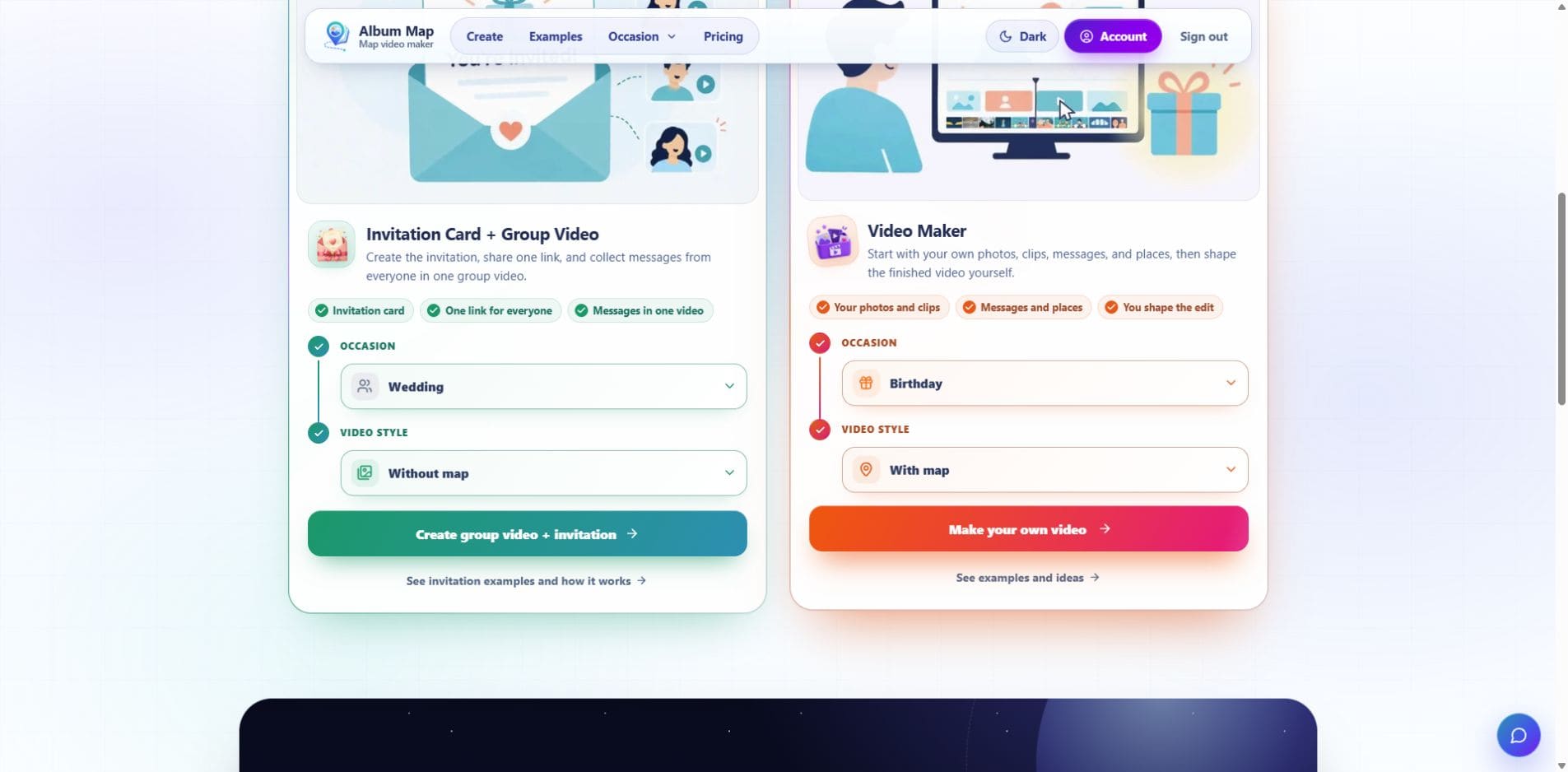
Open the full-size builder chooser screenshot for readable labels on a phone.
Sign in and save the album. Interactive-map access currently depends on eligible account access: an active Premium subscription or available video credits. Check the account and pricing before planning the output; a previously completed video does not by itself prove that interactive access is available now.
The Export interactive map control appears for eligible map projects. It is separate from Export video. If it is absent, check the selected map style and current account access instead of treating a different tool’s video export as the interactive result.
Step 3 of 7
What the dated owner-export check established
On 26 October 2026, a saved synthetic map with Toronto and Montreal test stops was exported from an administrator account displaying Premium. Export interactive map completed and produced an Open interactive map link. The separate Public interactive map panel still read NOT CREATED.
| Observed control or result | What it established |
|---|---|
| Open interactive map | The owner could open the exported map asset. This was not a completed test of the separate public Map URL. |
| Viewer password | The creation field required 8–128 characters; Create map URL remained disabled while it was empty. |
| Owner export at 1280 × 900 and 390 × 844 | The map, route and test labels rendered. Long labels extended beyond the visible frame at mobile width, so readable framing was not established. |
The builder’s embedded preview later reported that its page could not be opened, while the separately opened export rendered. Check the exact output you intend to send. An export link or a visible basemap alone does not verify readable memories, media playback or recipient access.
No public Map URL was created in this check. Correct/incorrect password entry, protected-recipient media loading, a shared-link update and revocation remain unverified. The two test stops used written notes rather than photo or video attachments; this is not a physical-phone or ordinary-plan trial.
Step 4 of 7
Give every place a small, self-contained story
For a first map, choose three broad places and one memory for each. For example, a fictional family collection could use Toronto for an early shared routine, Montreal for a trip story and Quebec City for a present-day wish. These are planning examples, not a published or tested interactive family map.
Do not rely on a color, marker shape or route order alone to explain a relationship. Use the actual labels and media the viewer can open. Keep your original source index separately from the shared selection.
Step 5 of 7
Export the current map before creating its viewer link
- Review the saved album’s selected media, locations and audience.
- Choose Export interactive map and wait for the current project’s interactive result to be ready.
- In Public interactive map, set Viewer password. The current control requires 8–128 characters.
- Choose Create map URL. Use the resulting Map URL, Copy link or Interactive map QR code for the viewer.
- Open the map link in a separate browser context and check the actual password and media-loading experience before distributing it.
The panel’s name, Public interactive map, describes the shareable viewer URL; the content still requires its viewer password. The guest contribution QR is a different destination and is not protected by that viewer password.
If the project changes after an export, create a current interactive export before assuming the shared viewer contains the new version. Recheck the recipient’s actual link, not only the organizer’s preview.
Step 6 of 7
Test what an invited viewer actually receives
The shared-map page presents a Password field and Unlock map. A correct password is only the beginning of the check: wait for the interactive map and media to finish loading, open each selected memory, and try the viewer on a phone as well as the larger screen you expect people to use.
Ask a reviewer to find a named memory without your help. Check that labels, captions and any spoken or written material remain understandable. Keep a text or video alternative for someone who cannot use the interactive viewing experience.
Test an incorrect password and the intended correct one only on your own authorized demonstration. A screenshot of a password field or a local video does not establish that the protected map opens correctly.
Share the password with the intended viewers and agree how the link may be passed on. The organizer’s Revoke control closes the shared map link; it cannot recall copies someone has already saved. Do not publish a private map’s link, password or access screenshots as part of a tutorial.
| Check | What to record |
|---|---|
| First visit | The exact exported version, intended recipient access and successful opening of each memory. |
| Changed project | A recognizable corrected caption or test image appears through the recipient’s link after the new export. |
| Closed sharing | After revocation, a fresh browser cannot reopen the old link. Previously downloaded or captured copies remain outside that control. |
Step 7 of 7
Keep the two sharing tasks separate
Contributors need the invitation or contribution link to send material. Viewers need the finished Map URL and viewer password to explore the selected map. Send each group the destination for its task rather than asking people to infer which QR code is meant for them.
Check the exporting and sharing FAQ and current plan access before creating the project. These product references and the repository’s controls were reviewed on 24 October 2026.
Keep verified originals and permission notes in the agreed private archive. The shared interactive selection is a viewing experience, not proof of an independent backup or a permanent media-retention promise. Recheck the active link and its audience when the project changes.
Finish line
Route complete: 7 steps
Need to check something again? Jump straight back to any stop.
- 1Choose exploration rather than a fixed video
- 2Start with the occasion builder and check account access
- 3What the dated owner-export check established
- 4Give every place a small, self-contained story
- 5Export the current map before creating its viewer link
- 6Test what an invited viewer actually receives
- 7Keep the two sharing tasks separate
Helpful answers
Frequently asked questions
Which tool creates the interactive occasion-memory map?
Start with the occasion Video Maker and With map. Eligible access provides a separate Export interactive map control. The dedicated Map Animator is the route-focused workflow.
What access is currently needed?
The account needs eligible interactive-map access, currently an active Premium subscription or available video credits. Check current account access and pricing before relying on the feature.
Is the contribution QR the finished map QR?
No. The contribution link collects material. The separately created Map URL and Interactive map QR open the password-protected viewer.
What is the viewer password requirement?
The current creation control accepts 8–128 characters. Test the actual authorized map link in a separate browser context before sharing it.